
IntuneModern Workplace
Windows Autopilot : construire une stratégie de déploiement moderne
Modes de déploiement, Enrollment Status Page, applications critiques : les choix qui font réussir (ou échouer) un projet Autopilot.
IntuneModern WorkplaceSCCM / MECM
Comment combiner intelligemment MECM et Microsoft Intune pour moderniser progressivement la gestion des postes de travail.
Beaucoup d'organisations gèrent encore leurs postes Windows avec Configuration Manager (SCCM / MECM) tout en voulant profiter de la souplesse d'Intune. Le co-management permet de ne pas choisir : les deux outils administrent le même poste, et l'on transfère les responsabilités une par une.
Une migration « big bang » vers Intune est rarement réaliste : applications packagées depuis des années, séquences de tâches, dépendances réseau, équipes habituées à la console. Le co-management apporte :
Moderniser le poste de travail, ce n'est pas remplacer un outil par un autre : c'est déplacer la gestion au rythme où l'organisation peut l'absorber.
Avant d'activer le co-management, vérifiez les points suivants :
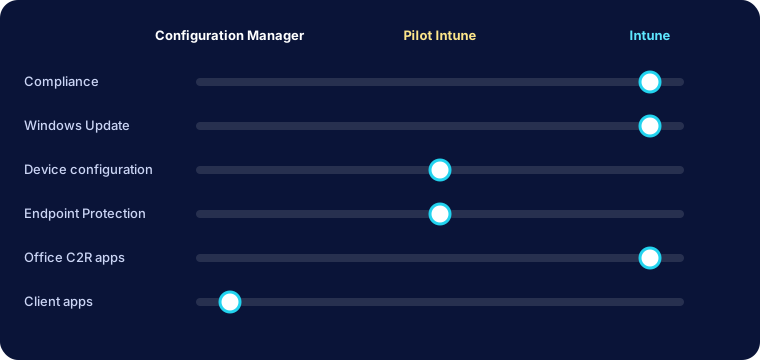
Chaque workload peut être positionné sur Configuration Manager, Pilot Intune (un regroupement de postes pilotes) ou Intune.
| Workload | Complexité de bascule | Recommandation |
|---|---|---|
| Stratégies de conformité | Faible | À basculer en premier : débloque l'accès conditionnel |
| Stratégies Windows Update | Moyenne | Pilote sur un anneau de postes non critiques |
| Configuration des appareils | Moyenne | Après analyse des GPO et profils existants |
| Endpoint Protection | Moyenne | Coordonner avec l'équipe sécurité |
| Applications Office Click-to-Run | Faible | Souvent rapide si les canaux de mise à jour sont clairs |
| Applications clientes | Élevée | En dernier : dépend du repackaging |
Commencez par la conformité, qui apporte une valeur sécurité immédiate, puis les mises à jour, puis la configuration. Les applications arrivent en dernier, car c'est là que se concentre la dette technique.
Sur un poste pilote, deux commandes suffisent pour un premier diagnostic :
# État de jointure (Entra ID / domaine)
dsregcmd /status | Select-String "AzureAdJoined|DomainJoined"

# Présence de l'inscription MDM (tâches planifiées EnterpriseMgmt)
Get-ScheduledTask | Where-Object TaskPath -like "*EnterpriseMgmt*"Many organizations still manage their Windows devices with Configuration Manager (SCCM / MECM) while wanting the flexibility of Intune. Co-management means you don't have to choose: both tools manage the same device, and responsibilities move over one at a time.
A "big bang" move to Intune is rarely realistic: applications packaged over many years, task sequences, network dependencies, teams used to the console. Co-management brings:
Modernizing the workplace is not about replacing one tool with another: it is about moving management at the pace the organization can absorb.
Before enabling co-management, check the following:
Each workload can be set to Configuration Manager, Pilot Intune (a collection of pilot devices) or Intune.
| Workload | Switching complexity | Recommendation |
|---|---|---|
| Compliance policies | Low | Switch first: unlocks Conditional Access |
| Windows Update policies | Medium | Pilot on a ring of non-critical devices |
| Device configuration | Medium | After reviewing existing GPOs and profiles |
| Endpoint Protection | Medium | Coordinate with the security team |
| Office Click-to-Run apps | Low | Often quick when update channels are clear |
| Client apps | High | Last: depends on repackaging |
Start with compliance, which delivers immediate security value, then updates, then configuration. Applications come last, because that is where the technical debt lives.
On a pilot device, two commands are enough for a first diagnosis:
# Join state (Entra ID / domain)
dsregcmd /status | Select-String "AzureAdJoined|DomainJoined"

# MDM enrollment present (EnterpriseMgmt scheduled tasks)
Get-ScheduledTask | Where-Object TaskPath -like "*EnterpriseMgmt*"Cloud Tech Innovation peut vous accompagner de la conception à la mise en œuvre.
Parlons de votre projet